Sean Avery · Updated
Viggle AI Face Swap Video: Free Limits and a Same-Clip Test
Viggle AI's Mix tool swaps a person into a video: upload a clip and a photo, and it replaces the whole character, keeping the motion. The free plan gives 5 videos a day with a viggle.ai watermark and keeps them 7 days. In our same-clip test, the model behind ClipTrend.ai's character swap kept the motion with no watermark.
Last updated: November 12, 2026 · tested October 28, 2026 · ~6 min read
On October 28, 2026 we ran the same 5-second dance clip and the same photo through Viggle's Mix tool on the free plan, and through Wan 2.2 Animate, the model behind ClipTrend.ai's AI character swap, called directly with the same settings the site uses. Here is what Viggle gives you for free, how to use it, and how the two results compare.
In this guide: what Viggle does · free limits · how to use it · same-clip test · which photo to use · the ClipTrend.ai way
What is Viggle AI face swap?
Viggle AI is a video tool that puts a person from a photo into a video. Its Mix tool takes a motion video and a photo and generates a new clip where the person from the photo performs the same movements. It replaces the whole character, not only the face, so the clothes come from your photo as well.
| Viggle Mix (free plan) | ClipTrend.ai character swap | |
|---|---|---|
| Watermark | viggle.ai, burned into the file | None |
| Output in our test | 768 × 1024, 25 fps | 816 × 1104, 30 fps |
| Clip length accepted | Up to 1 minute upload on the free plan | 3 to 10 seconds |
| Model | V4.5 Lite (in our test) | Wan 2.2 Animate |
What does Viggle give you for free?
These limits are from Viggle's pricing page and the Mix screen on October 28, 2026:
| Free plan | What it means |
|---|---|
| 5 free videos a day | The app showed "5 free credits"; each Mix used 1. Unused free credits expire every day. |
| 1 video generation at a time | You wait for one to finish before starting the next. |
| Watermark | "Skip Queue & No Watermark" is a paid option; free videos carry a viggle.ai mark. |
| 7-day storage | "On the free plan, videos are kept for 7 days." |
| 1-minute upload limit | Longer motion videos need a paid plan. |
The watermark is in the downloaded file itself. We downloaded both free results, and the viggle.ai mark sat on the left side of every frame.
How do you swap a face into a video with Viggle?
- Sign in at viggle.ai and open Mix.
- Under "Add a video", upload your motion clip, or pick one of the trending templates.
- Under "Add a photo", upload the person you want in the video.
- Click Generate (it shows the 1-credit cost) and wait; Viggle notifies you when "Your Mix is ready".
- Open the result and use the download button.
How does Viggle compare on the same clip?
We made one 5-second source clip of a man in a grey T-shirt dancing in place, then asked both tools to put a different man into it, using the same full-length photo: an AI-generated man (not a real person) in an olive T-shirt and light jeans.
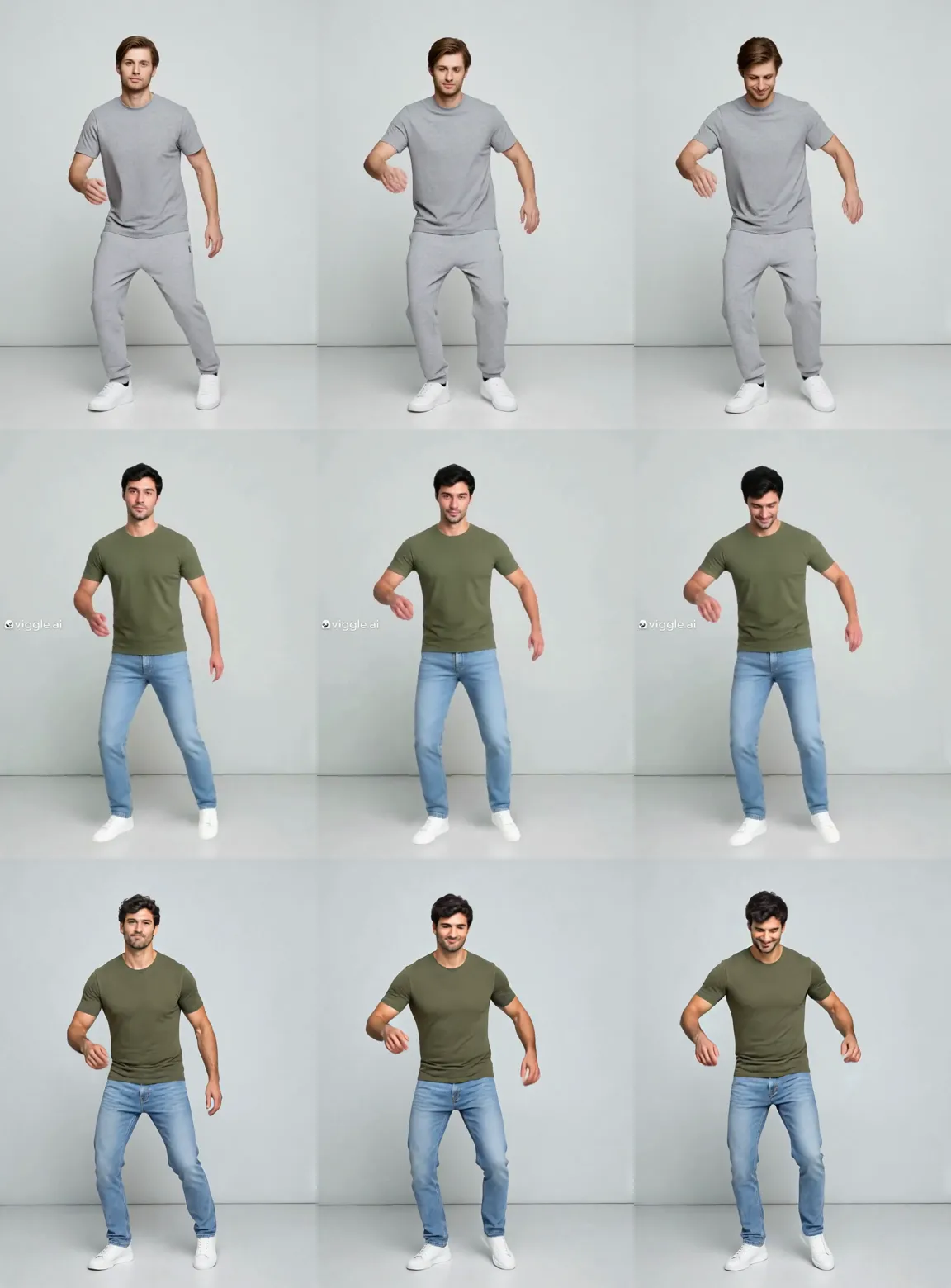
Top row: the source clip at 1, 2.5 and 4 seconds. Middle: Viggle Mix (free plan). Bottom: Wan 2.2 Animate at 720p, the model ClipTrend.ai's character swap uses. Both follow the dance in these frames. The viggle.ai watermark is visible on the left of each Viggle frame. Both keep his stubble; in these frames ClipTrend.ai's version keeps his wavier hair, while Viggle's hair looks smoother and straighter.
<video controls muted playsInline preload="none" poster="/imgs/blog/viggle-ai-face-swap-video-hero.webp" width="100%"><source src="/videos/blog/viggle-ai-face-swap-video-side-by-side.mp4" type="video/mp4" /></video>
Play all three side by side. Left: source clip. Middle: Viggle Mix (free plan). Right: Wan 2.2 Animate at 720p. No sound; 5 seconds.
| On the same clip | Viggle Mix (free) | ClipTrend.ai |
|---|---|---|
| Follows the dance | Yes | Yes |
| Outfit from the photo | Yes (olive T-shirt, light jeans) | Yes (olive T-shirt, light jeans) |
| Stubble from the photo | Yes | Yes |
| Hair in these frames | Smoother, straighter | Wavier, closer to the photo |
| Watermark | Yes | No |
| Output size | 768 × 1024, 25 fps | 816 × 1104, 30 fps |
This was one clip and one run on each, using the full-length photo. Our ClipTrend.ai sample was a direct call to the same model the site uses, so it shows the model's output, not the site's upload and download steps. Results depend on the clip, the lighting and the photo.
Which photo should you use for a character swap?
Use a full-length photo, standing straight, with a clear face, in the outfit you want to see. We also ran Viggle with a head-and-shoulders portrait of a different man; it still put his face on the dancer. The photo showed only a light grey crew-neck top from the shoulders up, and the result dressed him in a light grey long-sleeved top and black trousers. ClipTrend.ai asks for "a portrait with clear face and body framing" for the same reason.
How do you swap a character on ClipTrend.ai?
- Open the character swap and upload a source video: an MP4 of 3 to 10 seconds with one clearly visible person.
- Upload a full-length photo of the new character.
- Choose 480p or 720p and click Generate; the generator shows the exact credit quote before you confirm.
- Download the watermark-free MP4 from your history.
In our direct test, the model's 720p task took 206 seconds. To swap only the face in a video, see the video face swap.
Only use photos and videos you have the right to use, and get consent from anyone whose face you put in a video.
Frequently asked questions
Is Viggle AI face swap free?
Partly. Viggle's free plan gives 5 videos a day, one generation at a time, with a viggle.ai watermark, and keeps your videos for 7 days. Paid plans remove the watermark and keep videos permanently.
Does Viggle put a watermark on videos?
On the free plan, yes. In our test the viggle.ai watermark was burned into every frame of the downloaded MP4, not just shown in the preview.
How long does Viggle keep my videos?
Viggle's pricing page lists 7-day asset and generation storage on the free plan and permanent storage on paid plans.
Does Viggle swap only the face?
Viggle's Mix tool replaces the whole character, face and body, using your photo. In our test it took the clothes from the photo too, so use a full-length photo in the outfit you want to see.
Which photo should I use for a character swap?
A full-length photo with a clear face and body, standing straight, in good light, in the outfit you want to see. ClipTrend.ai asks for a portrait with clear face and body framing. In our Viggle test, a head-and-shoulders photo gave a result with clothes the photo did not fully show.
Is there a Viggle alternative without a watermark?
ClipTrend.ai's character swap delivers watermark-free MP4s on paid credits. It uses Wan 2.2 Animate, accepts 3 to 10 second clips and shows the exact credit quote before you generate.
Related guides
Put a new character into your clip
Upload a short clip and one full-length photo, and download the result without a watermark. Open the character swap.