
What the Ideogram AI image generator does best
Ideogram AI image generator: posters & headlines that spell right
Most image models smear letters into gibberish. Ideogram AI is built around typography — write the exact words in your prompt and it renders them legibly, correctly spelled, and laid out where you asked. This is the Ideogram image generator people reach for when they search "AI that can write text in images."
- ✓Legible, spelled-right text — headlines, taglines, multi-word phrases
- ✓Quote your copy — wrap the words in quotes and Ideogram AI honors them
- ✓Layout-aware — title, subtitle and badge land where you describe
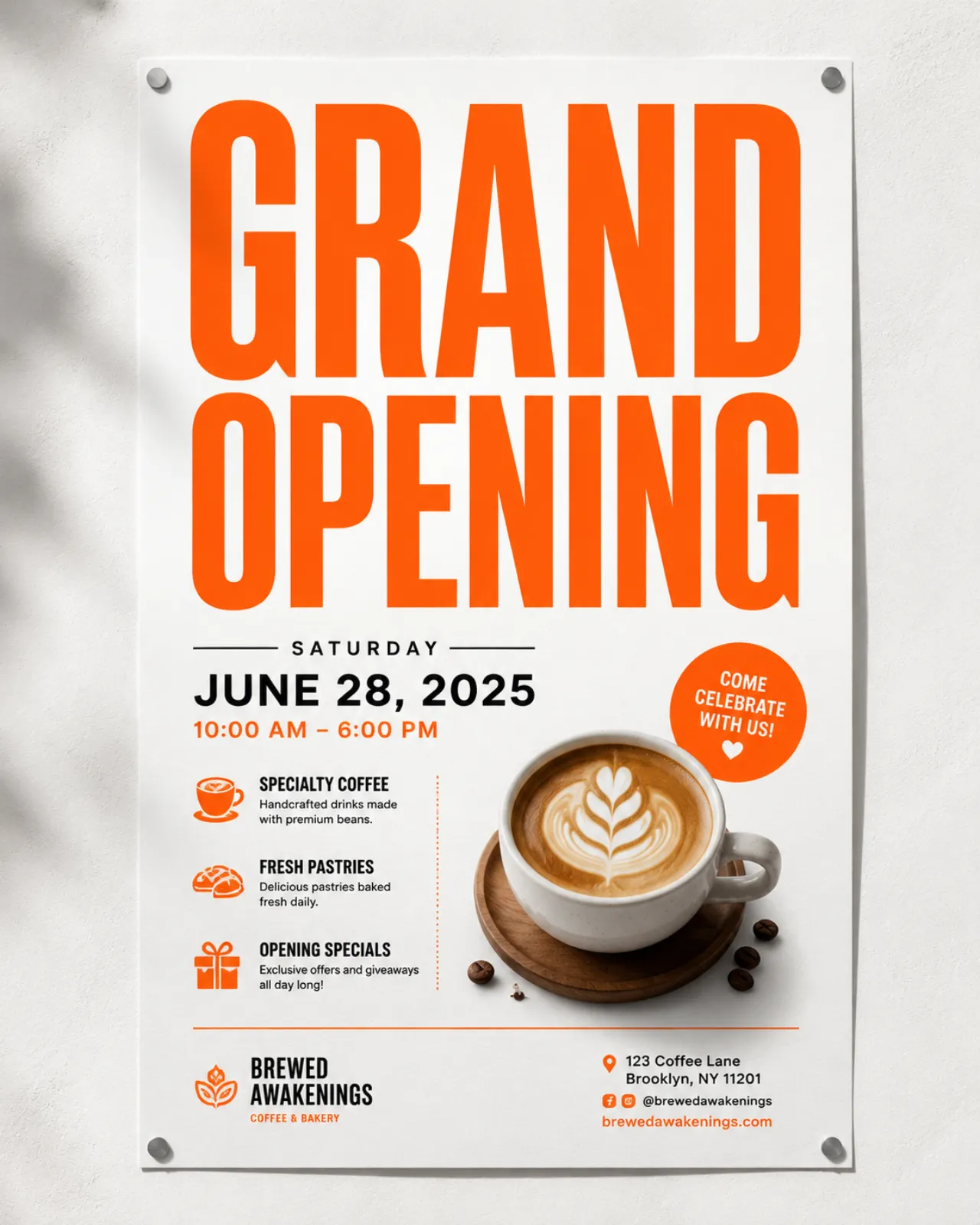
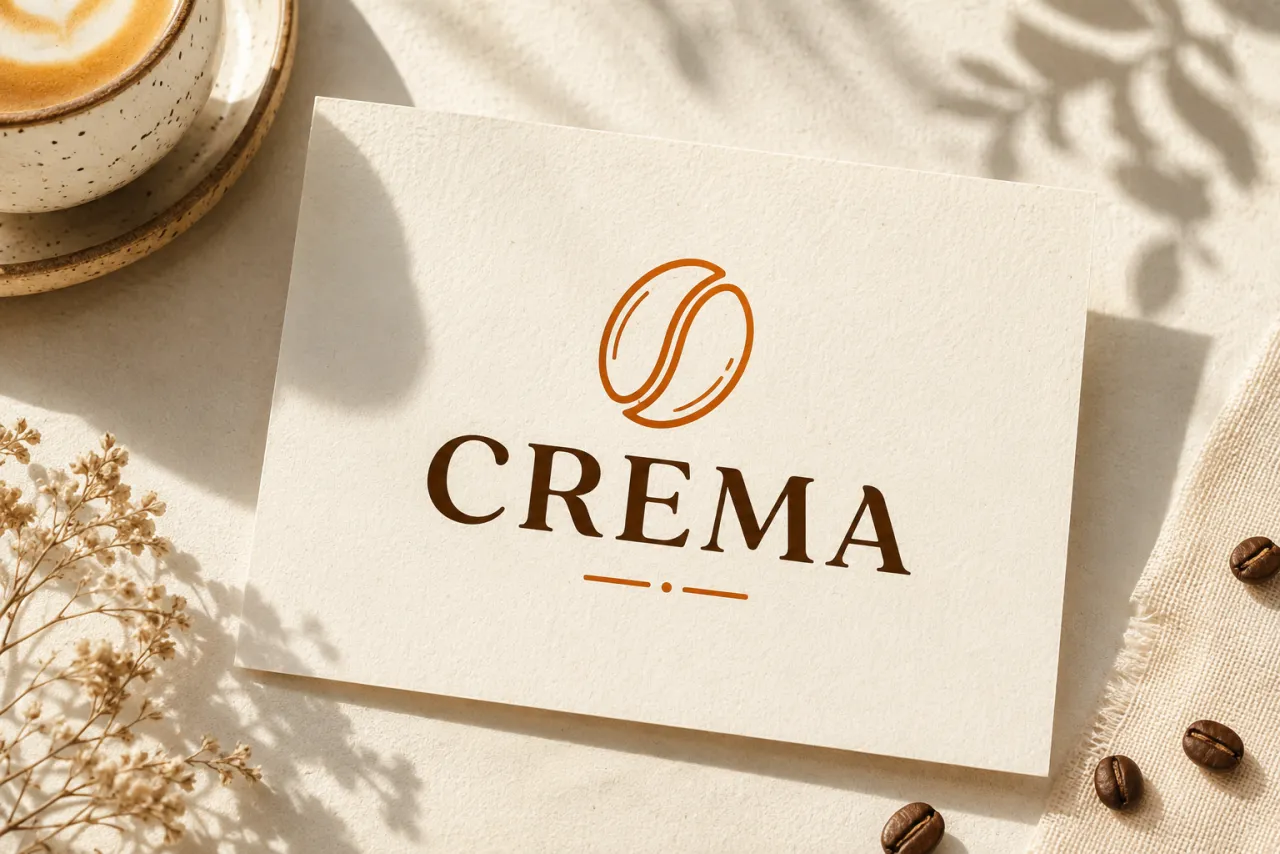
Draft an Ideogram logo or wordmark from a prompt
Because Ideogram AI actually renders letters, it doubles as a logo and wordmark sketchpad. Type "ideogram logo" of a brand name plus a style and a mark, and Ideogram AI returns a clean lockup with readable type — ideal for early branding rounds and moodboards before a designer refines it. It is the fastest way to test ten wordmark directions in minutes instead of hand-mocking each one.
- ✓Wordmarks & lockups — brand name plus icon in one Ideogram AI pass
- ✓Style control — flat, retro, neon, minimal, hand-drawn logos
- ✓5,000-char prompts — spell out colors, fonts and constraints in detail
TURBO, BALANCED & QUALITY on Ideogram 3.0
The Ideogram AI image generator exposes all three render-speed tiers of Ideogram 3.0. Iterate fast on TURBO, lock in your favorite on BALANCED (the default, matching Ideogram's own), then push the keeper to QUALITY for the cleanest final type. One model, three speeds — no model-switching mid-project.
- ✓TURBO — rapid drafts while you refine the wording
- ✓BALANCED — the default sweet spot for most work
- ✓QUALITY — sharpest letters for the final export


Logos, posters, ads, UI mockups & merch
The Ideogram AI image generator fits anywhere words must be readable: logos and wordmarks, social ad creatives and event posters, app and website UI mockups with real button labels, t-shirt and sticker text art, menu and packaging concepts, and quote graphics. When the picture has to say something out loud, run the Ideogram AI image generator online and let it do the lettering.
Try Ideogram AI free →Ideogram 3.0 vs Nano Banana Pro vs GPT Image 2 vs Wan 2.7
| Feature | Ideogram AI | Nano Banana Pro | GPT Image 2 | Wan 2.7 |
|---|---|---|---|---|
| In-image text rendering | Best-in-class | Good | Good | Basic |
| Logos & wordmarks | Built for it | Limited | Decent | No |
| Render-speed tiers | TURBO / BALANCED / QUALITY | No | No | No |
| Max prompt length | 5,000 chars | 2,000 chars | 20,000 chars | 2,000 chars |
| Best for | Logos, posters, UI text | Photoreal general-purpose | Editorial layout reasoning | Extreme aspect ratios |
Verdict — Pick the Ideogram AI image generator when words must be legible and correctly spelled — logos, wordmarks, posters and UI mockups are exactly what it's built for. Choose Nano Banana Pro for photoreal 4K general work, GPT Image 2 for very long layout-reasoning prompts, and Wan 2.7 for extreme aspect ratios.
Ideogram 3.0, explained
What is the Ideogram AI image generator, and why is it better at text?⌄
Ideogram AI is the text-to-image model from Ideogram, exposed on ClipTrend.ai through the Kie endpoint so you can run it without an Ideogram account. Its defining strength is typography: where general-purpose diffusion models tend to garble letters into nonsense, Ideogram AI reliably renders the words you write — correctly spelled, legible, and positioned where you describe — which is why it's the go-to for logos, wordmarks, posters and UI mockups. The build here is the latest Ideogram 3.0 release.
Ideogram AI accepts prompts up to 5,000 characters, giving you room to specify exact copy, fonts, colors, layout and style in one pass, and it runs a post-generation safety check before returning the file. There's no separate aspect-ratio or resolution menu to fiddle with — you steer the composition through the prompt itself, which keeps the model fast to drive even on long, detailed briefs.
Using Ideogram AI as a logo and wordmark generator⌄
Because Ideogram AI draws real, readable letters, it works as a quick logo generator. Describe a brand name, a mark and a style — "flat minimal coffee wordmark in deep orange" — and Ideogram AI returns a clean lockup you can iterate on instantly. It won't replace a designer, but it's the fastest way to explore directions, fill a moodboard, or hand a client ten wordmark options before refinement.
Pair the logo workflow with the render-speed tiers of Ideogram 3.0: rough out wordmark ideas on TURBO, confirm the winning direction on BALANCED, then re-run the keeper on QUALITY so the final logo type is as crisp as possible — all on the same model, so nothing about your prompt or look has to change between speeds.
Frequently asked questions
Can Ideogram AI actually spell words correctly in an image?⌄
Yes — that's the core strength of Ideogram AI. Put the exact words in your prompt (wrapping them in quotes helps) and the Ideogram image generator renders them legibly and correctly spelled, which is why it's preferred for logos, posters and UI labels over general-purpose image models.
Can Ideogram AI make a logo or wordmark?⌄
Yes — Ideogram AI doubles as a logo generator. Describe a brand name, a mark and a style and it returns a clean wordmark or lockup with readable type. It's ideal for early branding rounds and moodboards; run drafts on TURBO and finish the keeper on QUALITY for the sharpest logo letterforms.
What's the difference between TURBO, BALANCED and QUALITY on Ideogram 3.0?⌄
They're the render-speed tiers of Ideogram 3.0. TURBO is fastest for quick drafts, BALANCED is the default sweet spot for most work, and QUALITY spends more compute for the sharpest final text. Iterate on TURBO, finish on QUALITY — same Ideogram AI model, no prompt changes needed.
Can I run the Ideogram AI image generator online for free?⌄
Yes — you can run the Ideogram AI image generator online on ClipTrend.ai with no Ideogram account. Use it for readable, correctly spelled text — logos, wordmarks, posters, UI mockups — while Nano Banana Pro covers photoreal general-purpose images where in-image text isn't the point.







Make the image say it out loud with Ideogram AI
The Ideogram AI image generator that spells words right — logos, wordmarks, posters and UI text, watermark-free.
Generate with Ideogram AI