Sean Avery · Updated
AI Video Last-Frame Handoff: Prepare the Next Shot Without Losing Continuity
An AI video last-frame handoff starts after a clip is accepted: choose its usable ending frame, record the visual details that must recur, and use that approved output to brief the next shot. Do not treat every exported final frame as a reliable handoff. First decide whether the last moment is stable enough to become the next shot’s visual anchor.
This is a companion workflow to AI video first-and-last-frame control. That earlier guide plans two endpoint images before a clip is generated. This guide addresses the later question: after a generated clip works, how do you carry its useful ending into the next shot without quietly changing the character, product, location, lighting, or camera logic?
The handoff in one minute
- Watch the accepted clip at normal speed and stop on a settled end moment.
- Save the source clip, the chosen frame, and the exact version you approved.
- Write down the anchors that the next shot must inherit.
- Decide whether the next shot should begin from that still, extend the source motion, or deliberately cut to a new composition.
- Generate one next-shot test and compare its opening against the recorded handoff.
- Reject drift before you assemble a longer sequence.
The goal is to make drift visible early, when a new test is still easy to replace.
First, choose a usable ending frame
The final decoded frame is not automatically the best one. A good handoff frame is visually settled: motion has slowed enough that limbs, product edges, shadows, and background lines are readable. It should also leave the next shot a plausible place to begin.
Avoid using an ending frame when it contains any of these problems:
- A hand, face, object edge, or garment is halfway through a visible deformation.
- The camera is still accelerating, shaking, or reframing.
- The subject is blocked by a transition effect or motion blur.
- A product feature or environment detail has changed from its approved source.
- The model has introduced unreadable text, a mark, or an unsupported factual detail.
If the ending lands awkwardly, choose an earlier clean frame and trim in a conventional editor. Do not promote a broken final moment into the next shot just because it is technically the last frame.
Record the anchors before making another prompt
The best handoff note is short and specific. It separates details that must remain stable from the one thing the next shot is allowed to change.
| Anchor | What to record | Example |
|---|---|---|
| Subject | Identity, silhouette, pose direction, wardrobe, key accessories | “Adult subject, tan overshirt, facing three-quarters right” |
| Object or product | Shape, color, material, position, label area | “Matte green bottle on the left third; no readable label claim” |
| Environment | Architecture, horizon, furniture, visible landmarks | “Warm studio wall, round window behind subject” |
| Camera | Height, axis, crop, apparent lens feel, direction of travel | “Chest-height medium shot, slow rightward slide” |
| Light and color | Direction, time of day, key palette, reflection logic | “Soft window light from left; cool background, warm skin tones” |
| Motion state | What has just finished and what can happen next | “Turn completed; subject can now take one small step forward” |
Record the details a viewer would notice changing at the cut. Adobe’s reference-frame comparison guidance is a useful analogy: hold a reference frame while comparing the next image rather than relying on memory.
Pick the right continuation route
There are three different next-shot jobs. They should not be forced into one prompt.
1. Begin a new image-to-video shot from the approved frame
Use this route when the accepted ending gives you a clear still composition and the next shot can reasonably start from it. Export or capture the approved frame, retain its source clip beside it, and use the still as the visual starting point in Image to Video.
The prompt should say what continues and what changes:
Begin from the approved handoff image. Keep the adult subject, tan overshirt, studio wall, round window, left-side light, and chest-height camera relationship consistent. The subject takes one small step toward the window while the camera makes a slow rightward slide. Keep the bottle on the left third unchanged. Avoid new objects, text, wardrobe changes, or a new camera angle.
Make the first test modest. A large jump in pose, lens angle, room layout, and lighting turns a handoff into a redesign.
2. Extend the existing motion
Use Video Extend when the next moment should feel like the same continuous shot rather than a newly staged beginning. Extension is the better conceptual fit when the subject is already walking, the camera is already moving, or the action needs to continue without a cut.
An extension still needs review. The input motion is helpful context, but it is not a guarantee that a new segment will hold every detail. Keep the accepted clip, request one continuation beat, and inspect the join at normal speed and frame by frame where needed.
3. Make a deliberate cut
Use a cut when the story needs a genuinely new viewpoint, a different location, an intentional time jump, or a different action that cannot be physically explained from the accepted ending. A deliberate cut is often cleaner than demanding an impossible continuity bridge.
Preserve one or two anchors across the cut—such as the subject, product, color palette, or action direction—so the sequence still reads as connected. Then be honest about the change in the brief instead of asking an AI model to hide it.
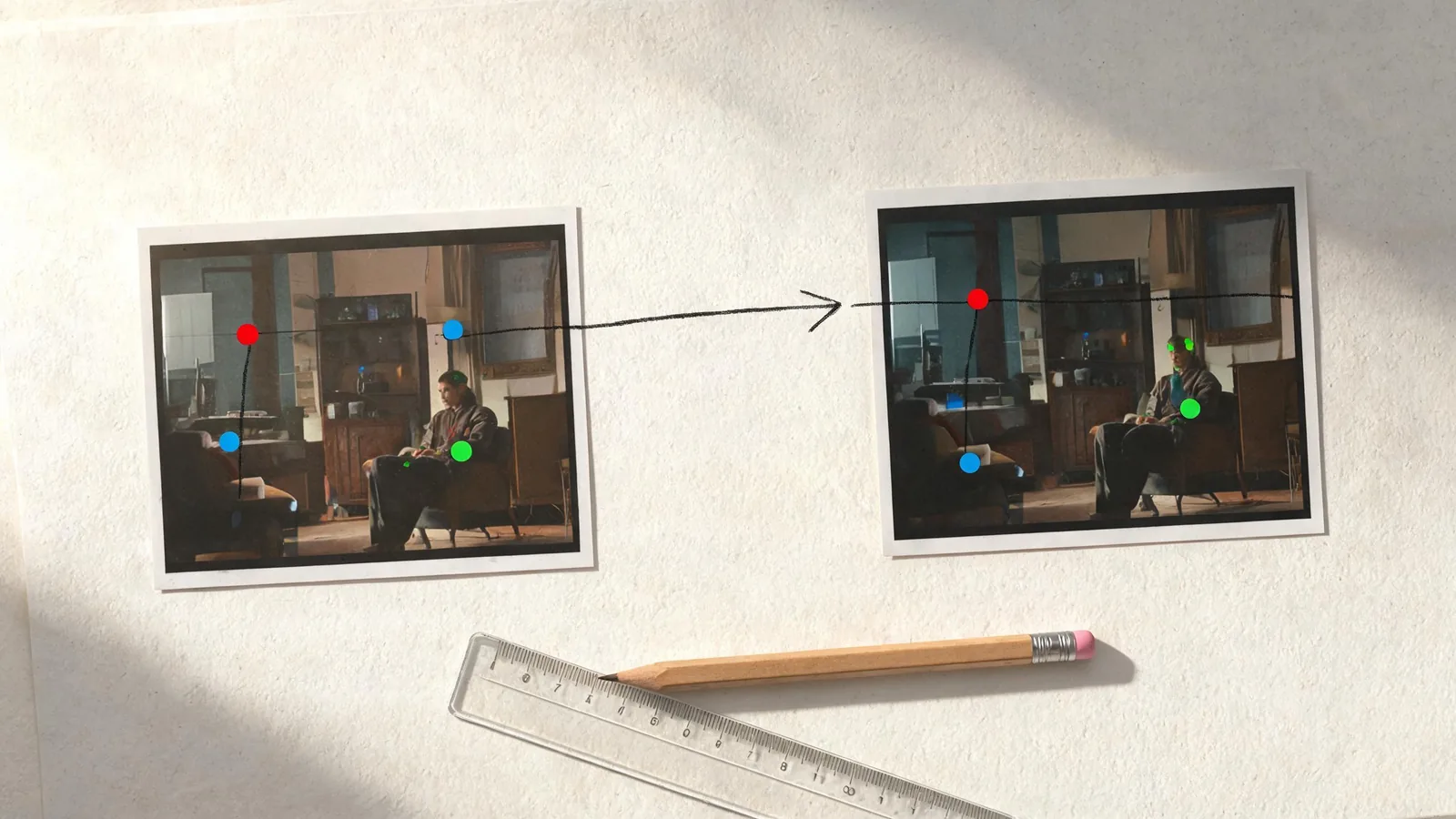
Conceptual continuity-planning visual, not a ClipTrend interface or a claimed model output.
A review loop that catches drift
Do not wait until several clips are assembled to find out that the handoff failed. Use this small loop for every proposed next shot:
- Put the accepted ending and the new opening side by side.
- Check the anchor list in a fixed order: subject, object, environment, camera, light, then motion direction.
- Watch the last second of the old clip into the first second of the new clip at normal speed.
- Check the seam again for geometry, reflections, hands, clothing, and product details.
- Decide: accept, make one limited correction, or replace the new shot.
The order matters. If subject identity has already changed, it does not help to perfect the color match first. Adobe notes that a reference frame can be retained while comparing a current frame; the same habit keeps an AI-video handoff grounded in an explicit visual reference rather than an impression.
Write prompts from the handoff, not from a wish list
A next-shot prompt works better when it distinguishes anchors from the new beat.
Use this pattern:
Start frame + retained anchors + one new action + one camera instruction + boundaries + ending behavior.
For a product sequence:
Start from the approved handoff frame. Keep the bottle’s matte green shape, cap, left-third position, table, shadow direction, and soft studio wall unchanged. Camera continues a slow rightward slide while the bottle remains still and a small highlight moves naturally across the surface. Do not add text, labels, extra products, hands, or a new background. Let the camera settle before the ending.
For a person or character, use only an authorized image and name the stable characteristics that are material to continuity. Keep the action small for the first continuation test. “New outfit, new room, dance turn, moving camera, sunset lighting” is a new scene request, not a handoff brief.
Common handoff failures and honest fixes
The next shot opens on a different camera axis
Evidence: The subject faces a different direction or the background relationship has flipped.
Impact: The join reads as accidental spatial discontinuity.
Fix: Start from the saved handoff still, state the camera height and axis, and request one simple move. If the new viewpoint is necessary, use a deliberate cut.
The subject or product changes at the seam
Evidence: Clothing, silhouette, material, or an important object detail differs between the ending and the next opening.
Impact: The sequence can mislead viewers or make an approved asset unrecognizable.
Fix: Revert to the approved handoff, reduce the requested change, and do not rely on generated text or labels as factual product evidence.
The last frame is visually unstable
Evidence: Motion blur, warped edges, or a transition artifact occupies the last moment.
Impact: The next prompt inherits a poor visual anchor.
Fix: Trim to an earlier settled frame or choose Video Extend if the motion itself must continue.
The second shot contains too much new information
Evidence: The prompt changes the location, lighting, pose, action, and camera at once.
Impact: There is no clear way to diagnose why continuity failed.
Fix: Split the beat into smaller shots and change one material variable per test.
FAQ
Is a returned last frame the same as end-frame control?
No. End-frame control provides a target image before generation. A returned last frame is an output you may review after generation. This guide is about evaluating that accepted output as a possible next-shot starting point.
Should every next AI video shot start from the previous final frame?
No. Start from the approved frame when it creates a plausible new shot. Use Video Extend for uninterrupted motion, or make a deliberate cut when the next scene genuinely needs a new viewpoint or time.
What is the most important continuity anchor?
The anchor a viewer would notice changing at the seam. For a product sequence it may be the product shape and its light direction; for a person it may be identity, clothing, and camera axis. Record that anchor before writing the next prompt.
Can I use a generated handoff frame as proof of a real event or product feature?
No. A generated frame can guide a creative continuation, but it is not independent evidence for a factual claim, testimonial, real event, or exact product detail.
Make the next shot accountable to the last one
Save the approved clip and choose a settled handoff frame. Record the anchors that matter, select the continuation route that matches the story, and compare the new opening with the accepted ending before assembling the sequence. That small discipline is what turns a generated ending into a usable next-shot brief rather than a continuity gamble.