Jelly Bed AI Video: Production Checklist for Creators
A jelly bed AI video works best as an openly fictional visual: decide the one visual gag, describe a solid translucent mattress rather than liquid, keep the action simple, review the finished physics, and label the result as AI-generated before posting. Use the effect as a stylized concept—not a product demonstration or a claim that a jelly mattress exists.
Last updated: August 31, 2026 · about 8 min read
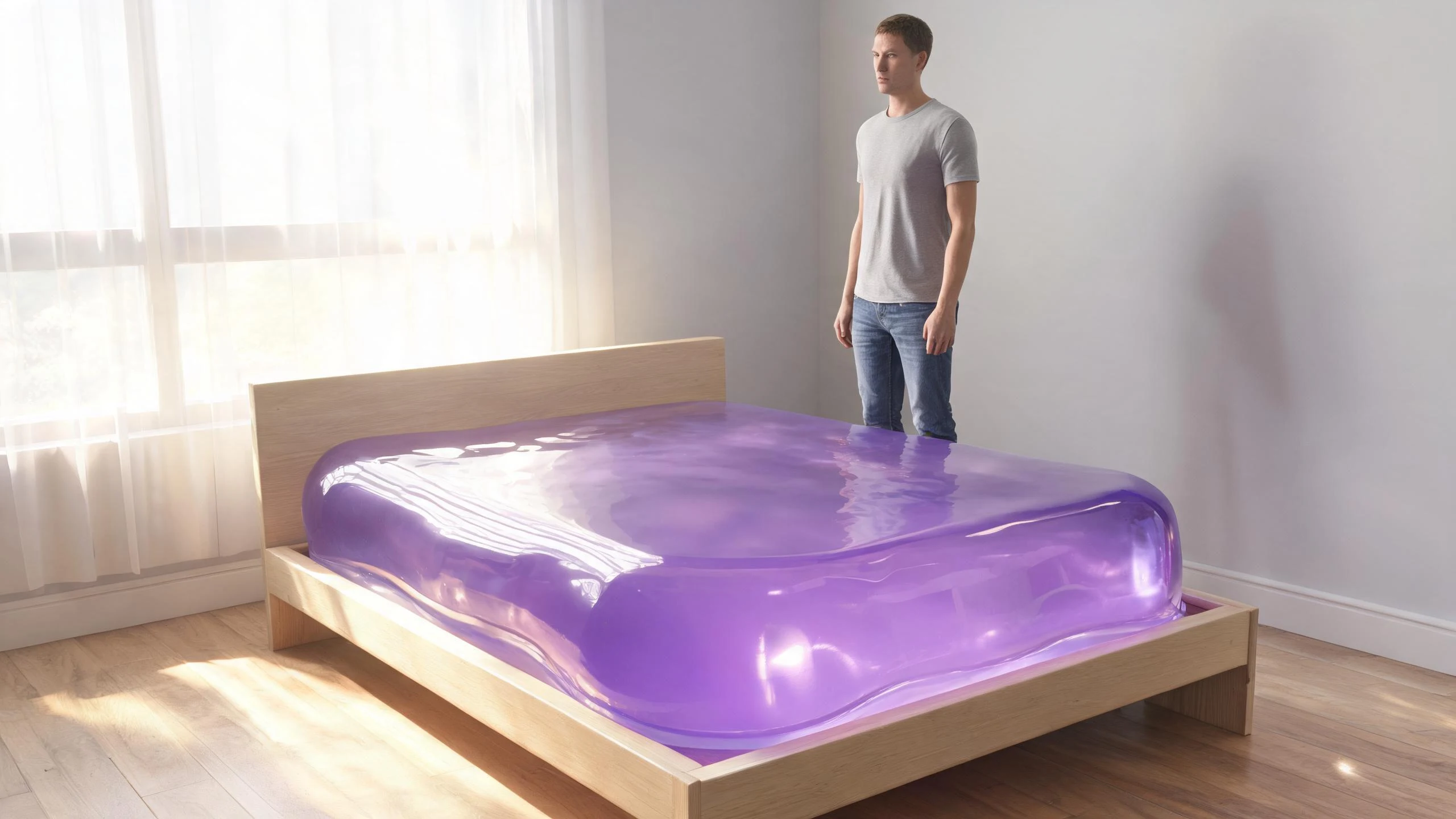
A clear fictional premise makes the concept easier for viewers to understand and for you to review.
What is the production goal?
The strongest jelly-bed clips make one impossible idea legible immediately: an ordinary room contains a colorful, solid, translucent mattress that wobbles when a person interacts with it. The point is visual surprise, not a realistic product claim.
That distinction matters because “jelly bed” can describe a viral synthetic look while real sleep products may use words such as gel or foam for entirely different materials. Do not caption a generated clip as evidence that a translucent, bounceable jelly mattress is available to buy. Say it is AI-generated or fictional when the visual could otherwise be mistaken for a real product or event.
This article is a companion to our older “Are Jelly Beds Real?” explainer. That page answers the factual viewer question. This guide serves a different creator intent: how to plan, make, review, and label an honest fictional jelly-bed clip.
Build a brief before you generate
A production brief prevents the prompt from becoming a pile of incompatible directions. Write one choice in each row, then generate a short test rather than a whole series.
| Brief element | Useful decision | Why it helps |
|---|---|---|
| Jelly material | Solid translucent jelly, not water or slime | Keeps the surface readable and avoids a liquid-looking mattress |
| Color | One main color, such as violet, amber, or teal | Reduces visual noise and gives the clip a recognizable hook |
| Room | A simple bedroom, loft, or studio | Gives the subject and mattress a stable scale reference |
| Person | One clearly adult, fully clothed character | Makes the motion easier to inspect and avoids unnecessary ambiguity |
| Action | One sit, side drop, small bounce, or careful jump | Limits anatomy and physics failures |
| Camera | A single wide or medium view | Lets viewers understand the impossible object before the motion begins |
| Caption | “AI-generated fictional jelly-bed concept” | Prevents a fake-product implication |
Avoid adding every variation at once: rainbow color, food toppings, underwater reflections, multiple people, a fast camera move, and a dramatic fall all compete for attention. A clear first clip is more useful than an elaborate output you cannot explain or safely share.
Write for solid jelly physics
Use concrete visual language. “Translucent solid jelly mattress with a visible bed frame, glossy highlights, a slow wobble after a gentle bounce” tells the model what should stay consistent. Liquid words—pouring, splashing, flowing, dripping, ocean-like—pull the result toward a different material and can make the concept unreadable.
Try a brief like this, then adapt it to the live tool:
A bright modern bedroom, one fully clothed adult beside a translucent violet solid-jelly mattress on a simple bed frame. The adult sits down gently; the mattress compresses, wobbles, and rebounds. Medium-wide camera, natural daylight, clearly fictional AI visual, no liquid or splash.
It is a starting description, not a promise of a specific result. Keep a note of what changed between attempts: source image, color, action, room, or camera. Changing one variable at a time gives you a meaningful review loop.
For the current generator inputs and available settings, use the live Jelly Mattress template. Confirm the page’s current controls and credits before generating; this article does not claim a fixed render time, output format, or price.
A small production sequence
- Choose the audience and label first. If the clip is for a client or brand, agree that it will be presented as a concept rather than a real item. If it will go to social media, prepare a direct AI-generated disclosure.
- Draft one scene. Select one color, one room, one adult character, and one action. Keep the initial camera still enough for a viewer to understand the setup.
- Generate a test. Use the current Jelly Mattress template and a short prompt. Do not add unapproved people, logos, or copyrighted characters to the input.
- Watch it from beginning to end. Check the mattress edges, bed frame, floor contact, person’s limbs, clothing, and final pose. Pause on the bounce and any camera transition.
- Correct one issue. If it reads like water, remove liquid terms. If the person is unstable, simplify the action. If the room shifts, reduce the number of scene details.
- Caption honestly. Describe the clip as a fictional AI visual. Do not imply that the bed was filmed, tested, sold, or endorsed.
- Save only the approved variant. Keep your prompt and output together so a teammate can see which version was reviewed and labeled.
Review the visual before publishing

A quick visual review catches most misleading or distracting failures before a post is scheduled.
Use this review card:
- Fiction is obvious: Is the caption or on-screen context clear that this is AI-generated? Could a viewer reasonably take it for an advertised physical mattress?
- Material is consistent: Does the bed read as solid jelly—wobble, compression, and rebound—rather than water or a melting object?
- Scale holds: Is the mattress anchored to a plausible frame and room? Does the person’s contact with it look coherent enough for the intended stylized effect?
- No unwanted assets: Are there unfamiliar brand marks, copied characters, people, or text-like fragments that did not belong in your brief?
- Audience fit: Is the action appropriate for the account’s audience and stated use? A playful visual does not need a risky or sexualized performance to work.
Reject the output when it is confusing, deceptive, or inconsistent with the brief. Do not try to solve a misleading synthetic video with an ambiguous caption; redo it or choose a simpler scenario.
One relevant tutorial, with a limitation
Fotor’s tutorial below is included because it directly covers the jelly-bed effect. It is not a ClipTrend demonstration, does not verify ClipTrend features or pricing, and should be treated as independent workflow context rather than product instructions.
The tutorial shows how to make the jelly-bed effect with Fotor. The relevance is specific to the effect, but the external tool and its workflow may differ from ClipTrend.
Keep disclosure practical
YouTube’s current GenAI disclosure guidance requires creators to disclose realistic content that is meaningfully generated or altered by AI, including realistic scenes that did not happen. It also explains how the upload setting can apply a label. Use the platform’s live guidance at upload time; other platforms may use different controls.
For a jelly-bed visual, a plain caption is usually clearer than clever ambiguity: “Fictional AI-generated jelly mattress concept.” If a brand is involved, do not imply that it manufactures the item unless that is true and approved. Disclosure helps viewers interpret the content; it does not resolve a false claim, an unlicensed asset, or a harmful depiction.
For bigger trend-planning decisions, see our AI video trend lifecycle guide. For a broader review of claims and visual risk, see the brand-safe AI video checklist.
FAQ
Are jelly bed videos real?
The viral translucent, wobbling jelly-bed look is generally a fictional AI or VFX-style concept. Do not present a generated jelly-bed clip as proof of a real purchasable mattress; see our “Are Jelly Beds Real?” explainer for that separate viewer question.
What should I put in a jelly-bed AI video prompt?
Specify a solid translucent jelly mattress, one color, a simple room, one adult character, one restrained action, and a clear camera view. Avoid liquid words such as splash, pour, or flow if you want a solid-jelly result.
How do I make an AI jelly-bed video less misleading?
Make the fictional premise clear in the caption, avoid real-product claims, review the finished clip for confusing details, and use the destination’s current AI disclosure setting when applicable.
Why does my jelly bed look like water?
Too many liquid terms or effects can pull the result away from a solid material. Simplify the prompt to solid jelly, visible frame, compression, wobble, and rebound, then change one variable per retry.
Sources
- ClipTrend, Jelly Mattress template
- ClipTrend, Are Jelly Beds Real?
- YouTube Help, Disclosing use of GenAI content
- YouTube, Jelly Bed Effect Tutorial