Product Launch Video Shot List: Four Shots for Teams
A product launch video shot list should name four jobs before you generate anything: identify the product, show one meaningful detail, place it in honest context, and end on a usable frame. This short plan keeps an AI-assisted sequence focused and makes it clear which information must come from approved photography or a regular editor. It is a planning aid, not evidence of a product feature or performance.
Last updated: September 3, 2026 · about 7 min read
This is a companion to our earlier product launch video template guide. That article helps choose and use a template from existing product photos. This page answers the different pre-production question: which shots should be planned, approved, and reviewed before a template or AI motion workflow begins?
Start with the one thing the viewer must understand
Write a single sentence that says what the viewer should recognize in the first seconds. It might be “this is the new insulated bottle,” “this bag has an accessible side pocket,” or “this software takes a request to a finished draft.” If the statement includes a measurable benefit, a regulated claim, or a comparison, make sure the final edit can support it with approved evidence.
Then choose the placement: a vertical social post, a product-page clip, a paid ad, or an email header. The same product may need a different opening and different safe area for each surface. A shot list prevents the common mistake of generating a beautiful but unusable frame before anyone decides where the caption, interface controls, or call to action will go.
Use a four-shot launch sequence
Four shots are enough for a first short sequence. Each gets one purpose, one approved source, and one review note. Do not ask a single generated clip to invent packaging text, product proof, a testimonial, and a cinematic location at the same time.
| Shot | Viewer question | Best approved source | What stays outside generated motion |
|---|---|---|---|
| Hero | What is it? | Clean product photo with a clear silhouette | Exact brand text, price, legal copy |
| Detail | What should I notice? | Real close-up of a material, control, or feature | Claims about durability, safety, or results |
| Context | Where or how is it used? | Approved real-use photo or recorded screen | Unverified before-and-after implications |
| End frame | What should I do next? | Stable product frame or normal graphic | CTA, offer date, availability, disclaimer |
The sequence is not a formula for every launch. A software demo may need a real screen recording in the context slot. A food product may need actual preparation footage. If an image-to-video treatment changes the material product, replaces a real use moment, or makes a claim look documented, use conventional footage or an editor instead.
Build the shot list before selecting a template
For each row, write these five details in a note:
- Shot purpose: What should a viewer understand from this one moment?
- Source approval: Which exact photo, recording, or asset has been cleared for this use?
- Motion request: What is the single allowable visual change—a slow push, a gentle light shift, or a simple cut?
- Must-not-change details: Which shape, colour, interface state, label area, or person must remain accurate?
- Exit frame: What should the final frame leave room for when you cut to the next shot?
This makes an AI template a small creative tool inside a controlled plan. Our AI video templates can be useful for a restrained visual beat, but the sequence still needs a human owner who can reject a result that changes the product or alters the intended message.
A practical example: an unbranded bottle
Imagine a launch for a new reusable bottle. The hero is a clean approved packshot with a slow camera push. The detail is a real close-up of the cap texture. The context is a genuine photo of the bottle on a day hike, but not a claim that it kept a beverage cold for a particular duration. The end frame is a stable packshot with empty room for an editor-added product name and CTA.
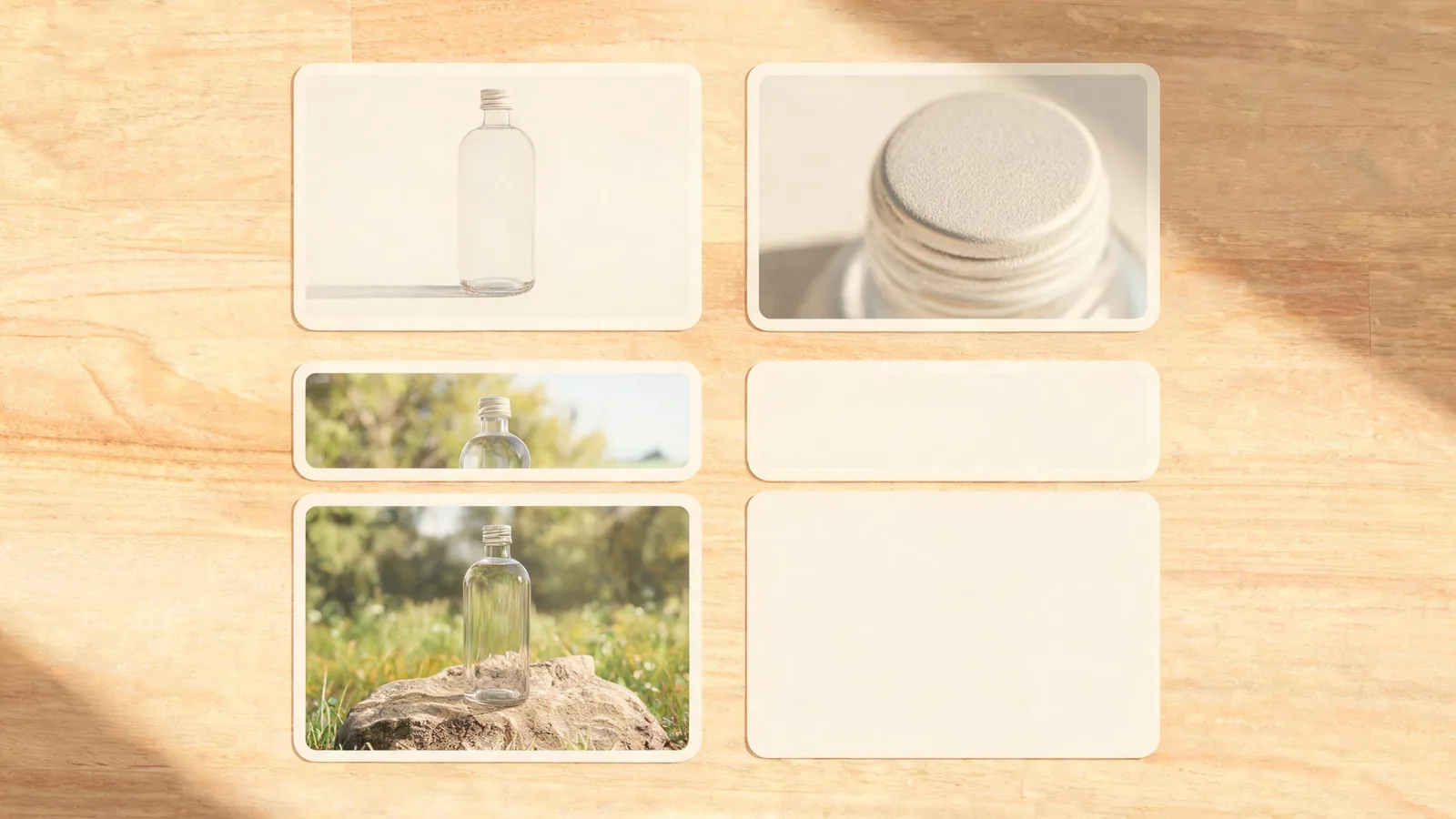
A shot list lets the team approve what each frame is responsible for before visual treatment begins.
Notice what is deliberately missing: generated label text, price, performance proof, customer opinion, and a simulated product test. Those should come from verified source material and a normal editorial layer. This is often faster to revise, too; a late price or availability change does not require another visual render.
Review shots in order, then as a sequence
Review each finished clip against its source, then play the planned order without sound. Check whether the product is recognisable in the hero, whether the detail actually supports the first message, whether the context reads truthfully, and whether the final frame can hold the next edit.
Use this release checklist:
- Does each shot have a single purpose that a viewer can understand quickly?
- Are the source photo, recording, music, and any people or locations cleared for the intended distribution?
- Did generated motion change the product's shape, colour, parts, or readable areas?
- Are factual claims, prices, dates, and terms added only after normal review?
- Does the crop work with captions, accessibility copy, and platform controls?
- Does the final frame give the editor enough stable space for the actual next step?
If a shot fails, replace that shot rather than rebuilding the whole sequence. One clean real detail is more useful than several variations that disagree about the product.
Keep provenance and disclosure in scope
For launches where an AI-assisted image could confuse an audience about how a product was filmed or demonstrated, plan clear context for the placement. A caption or creative label may be appropriate depending on the platform and audience. Keep the original approved assets, prompts, output choices, and reviewer notes with the campaign files.
The C2PA Content Credentials explainer explains how signed provenance assertions can provide information about an asset's origin and edits. This is a useful recordkeeping option where supported, but it cannot confirm a product claim, grant a licence, or replace your own approval process.
A relevant tutorial, with limits
The video below is an independent lesson on building a shot list. It is useful for general planning context, but it does not describe ClipTrend functions, pricing, rights, or product-review requirements.
Use it as a general planning reference and check current tools and destination policies before publication.
FAQ
What should be on a product launch video shot list?
For a short first version, include a hero product view, one genuine detail, an honest use or context frame, and a stable end frame. Record each shot's purpose, approved source, permitted motion, details that must not change, and intended exit frame.
Can an AI-generated product shot prove a feature works?
No. Generated motion can be a creative treatment, but it is not dependable evidence for a performance, result, review, or exact product specification. Use verified footage, approved copy, and a normal editor for factual proof.
How many shots does a launch video need?
There is no fixed number. Four purpose-led shots are a useful first planning limit because they make each frame accountable. Add a shot only when it answers a different viewer question or is required by the placement.
Should the CTA be generated inside the video clip?
Keep the CTA, price, offer dates, legal language, and exact brand spelling in a reviewed editing layer. A stable end frame gives that factual information a safer home and makes late changes simpler.
Sources
- ClipTrend.ai, product launch video template guide
- ClipTrend.ai, AI video templates
- Coalition for Content Provenance and Authenticity, Content Credentials explainer
- Porker_13, Shot List Like a Pro Filmmaker