AI Video Camera Movement Prompts: Pan, Zoom, Dolly, Orbit
AI video camera movement prompts work best when you name one move, one direction, one speed, and one thing that must stay stable. Instead of writing "cinematic dynamic motion," tell the model to do a slow push-in, a gentle pan, a small orbit, or a locked-off shot in the ClipTrend.ai image-to-video tool.
Last updated: July 2, 2026
Camera movement is what turns an AI clip from a moving still into a directed shot. It also causes many failures. When the camera moves too aggressively, the model has to invent unseen sides of faces, products, rooms, and backgrounds. That is where warping starts.
Use this guide as a practical prompt bank.
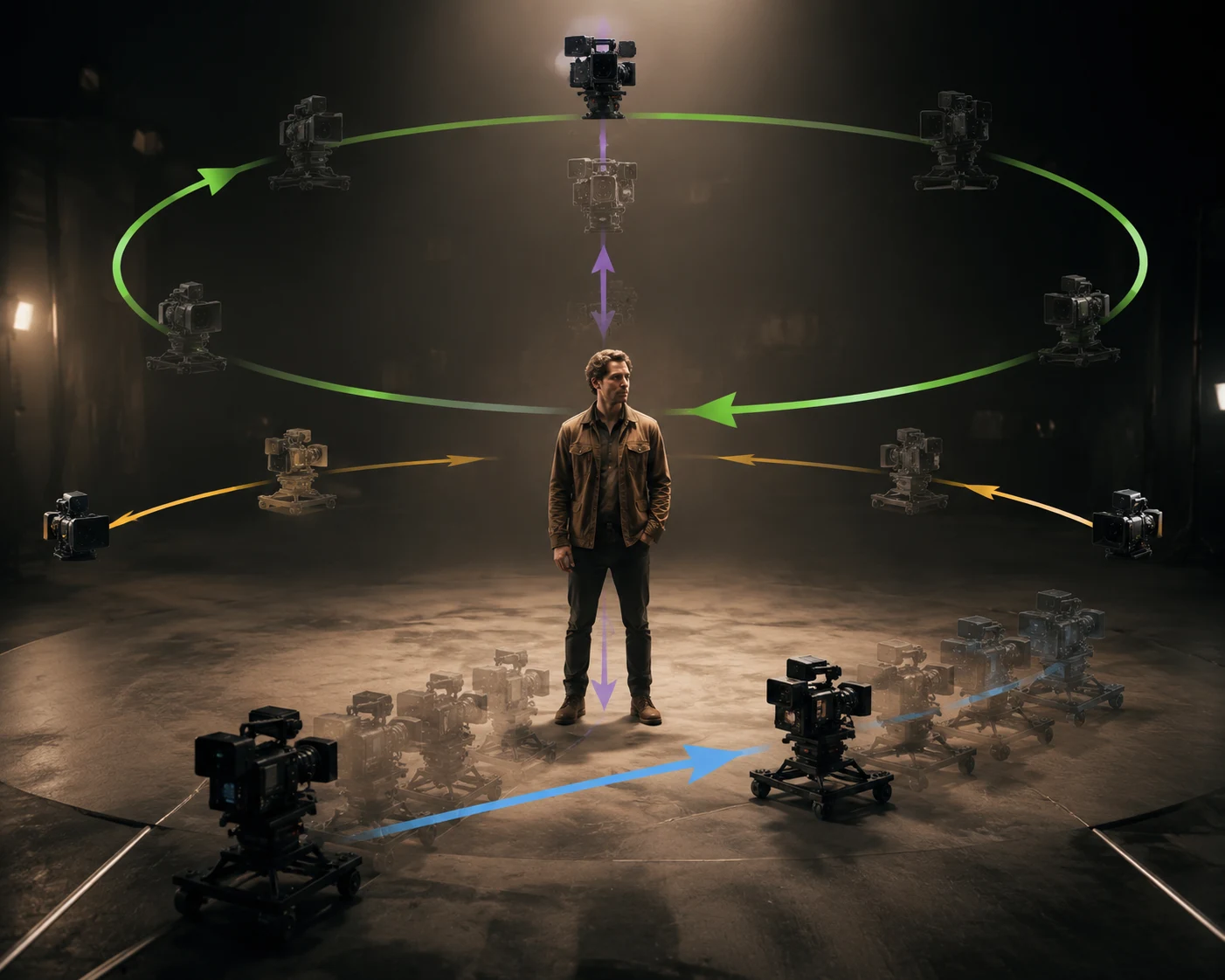
A clear camera move gives the model a job. A pile of film words gives it a guessing game.
Quick camera movement chart
| Movement | Prompt phrase | Best for | Risk level |
|---|---|---|---|
| Locked-off | "locked-off camera, only subtle subject motion" | Faces, products, realistic clips | Low |
| Slow zoom in | "slow zoom in toward the subject" | Simple emphasis, social hooks | Low |
| Dolly push-in | "smooth dolly push-in toward the product" | Product ads, cinematic portraits | Low-medium |
| Pan | "slow pan from left to right" | Landscapes, interiors, wide scenes | Medium |
| Tilt | "gentle tilt upward to reveal the skyline" | Vertical reveals, architecture | Medium |
| Tracking | "stable tracking shot following the subject" | Walking, action, character motion | Medium-high |
| Orbit | "slow 20-degree orbit around the subject" | Products, statues, 3D-looking shots | High |
If you are unsure, start with locked-off or slow push-in.
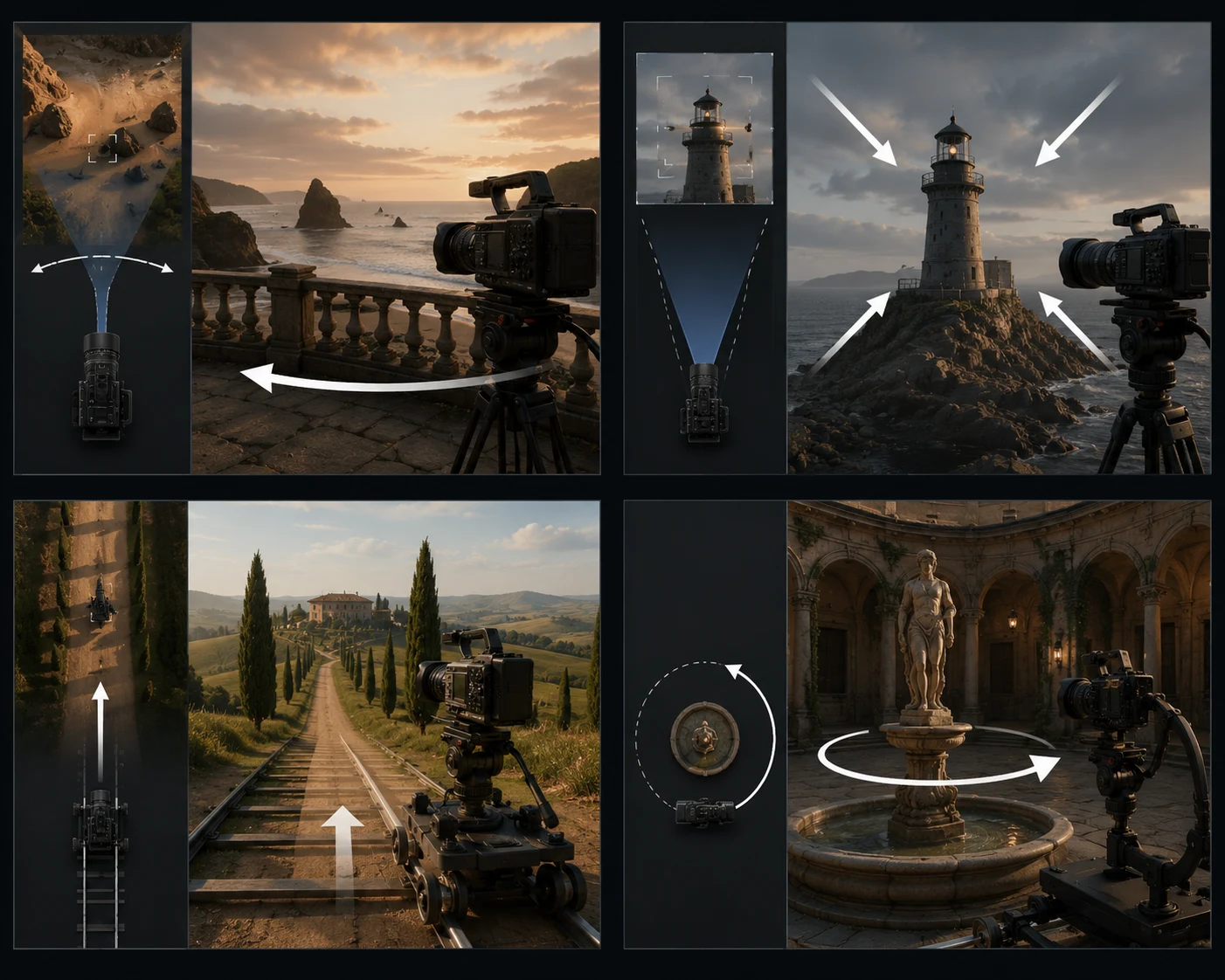
The safest movement is the one that changes the least while still making the clip feel alive.
The safest prompt formula
Use this:
[Subject and scene]. Camera: [one movement], [speed], [direction]. Subject motion: [one small action]. Keep [protected details] stable. End on [final frame].
Example:
A glass skincare bottle on a stone bathroom counter. Camera: smooth slow dolly push-in toward the bottle. Subject motion: soft morning light moves across the glass and faint mist drifts behind it. Keep the bottle shape, label, and cap stable. End on a centered product hero frame.
This prompt works because it separates:
- Camera movement.
- Subject or environment movement.
- Stability.
- Ending.
Locked-off camera prompts
Locked-off means the camera does not move. This is the safest option for faces, hands, small products, and realistic motion.
Use when:
- The subject identity must stay stable.
- The product label matters.
- The photo has a complex background.
- You want realism over drama.
Prompt examples:
Locked-off camera. The person takes one calm breath and blinks naturally. Keep face, hands, clothing, and background stable. Soft natural light, realistic motion.
Locked-off product shot. Only the steam behind the coffee cup moves slowly. Keep the cup shape, logo, handle, and table unchanged. End on the same composition.
Static camera, subtle breeze moves the curtain and a few strands of hair. Keep the face and body pose stable, no camera movement.
Zoom prompts
Zoom is simple and direct. It makes the subject feel closer without requiring the model to invent much new geometry.
Use when:
- You need a social hook.
- The subject is centered.
- The clip is short.
- You want emphasis, not a full camera move.
Prompt examples:
Slow zoom in toward the subject's face over 4 seconds. Natural blink, slight smile, keep identity and background stable.
Slow zoom in on the product, crisp studio lighting, subtle shadow movement, keep label readable and product shape stable.
Very gentle zoom out to reveal the full outfit, keep the person centered, natural posture, no background change.
Avoid:
- Fast zooms on faces.
- Zoom plus orbit plus subject turn.
- Zoom into tiny text.
Dolly prompts
Dolly means the camera appears to move through space. In AI prompts, a dolly push-in often looks more cinematic than a simple zoom, but it carries slightly more risk.
Use when:
- You have a strong product photo.
- The subject is not too close to the frame edge.
- The background can tolerate slight parallax.
- You want a premium ad feel.
Prompt examples:
Smooth dolly push-in toward a matte black sneaker on a studio pedestal. Soft side light moves across the leather, background stays clean, keep shoe shape and sole details stable.
Slow dolly backward from a portrait to reveal more of the room, natural light, subject stays still, keep face identity stable.
Gentle dolly push-in through a cafe window toward a coffee cup, shallow depth of field, realistic reflections, keep cup shape stable.
Pan prompts
A pan rotates the camera left or right. It works best for wide scenes where there is room to reveal details.
Use when:
- The source image is landscape or wide vertical.
- The subject is environment-based.
- You want to reveal left-to-right or right-to-left.
Prompt examples:
Slow pan from left to right across a mountain village at sunrise. Mist moves gently, horizon stays stable, buildings remain sharp, natural cinematic light.
Slow pan from right to left across a product shelf, keep all products stable, no label distortion, smooth retail ad style.
Gentle left-to-right pan across a room interior, sunlight on the wall, furniture stays fixed and realistic.
Avoid pans on tight faces unless the motion is very subtle.
Tilt prompts
Tilt moves the camera up or down. It is useful when the subject has vertical structure.
Use when:
- You want to reveal a building, outfit, skyline, or tall product.
- The composition has vertical room.
- The subject can stay stable while the camera moves.
Prompt examples:
Gentle tilt upward from the shoes to the full outfit, fashion editorial style, keep body proportions natural, no face change.
Slow tilt up to reveal the full skyscraper, stable vertical lines, realistic daylight, no bending architecture.
Tilt down from the glowing sign to the table setting, warm restaurant mood, keep objects sharp and stable.
Orbit prompts
Orbit is powerful but risky. It asks the model to show sides of the subject that may not exist in the source image.
Use when:
- The subject is symmetrical or product-like.
- The source image has clean shape information.
- The orbit is small, slow, and limited.
Prompt examples:
Slow 20-degree orbit around the product, keep label facing mostly forward, realistic studio lighting, product shape stable, no full rotation.
Small slow orbit around a statue, camera moves only slightly, stone texture stable, background calm.
Gentle partial orbit around a sneaker, 15-degree movement, keep sole shape and logo stable, end on a hero angle.
Avoid:
- 360-degree orbit from one flat image.
- Fast orbit on faces.
- Orbit around transparent or reflective objects.
- Orbit plus big subject motion.
Tracking prompts
Tracking means the camera follows a moving subject. It can look great, but it requires the model to coordinate subject motion, background motion, and camera motion.
Use when:
- The subject is walking or moving in one direction.
- The background is simple enough to pass behind them.
- You accept a slightly higher failure rate.
Prompt examples:
Stable tracking shot following a runner from the side, smooth motion, natural arm swing, background passes slowly, keep body proportions realistic.
Camera tracks behind the cyclist on a quiet road, gentle forward motion, stable horizon, no sudden camera shake.
Slow tracking shot following a dog walking along the beach, natural leg motion, soft waves, stable camera.
If tracking fails, reduce the motion first. Do not add more detail.
How to combine camera moves safely
Good combinations:
- Dolly push-in + slight tilt up.
- Locked-off camera + subject motion.
- Slow zoom + soft light movement.
- Small orbit + no subject motion.
Risky combinations:
- Fast orbit + zoom + subject turn.
- Tracking + background transformation.
- Pan + tilt + dolly in one short clip.
- Handheld shake on faces or products.
The first render should test the camera move only. Add style and secondary motion after the basic shot works.
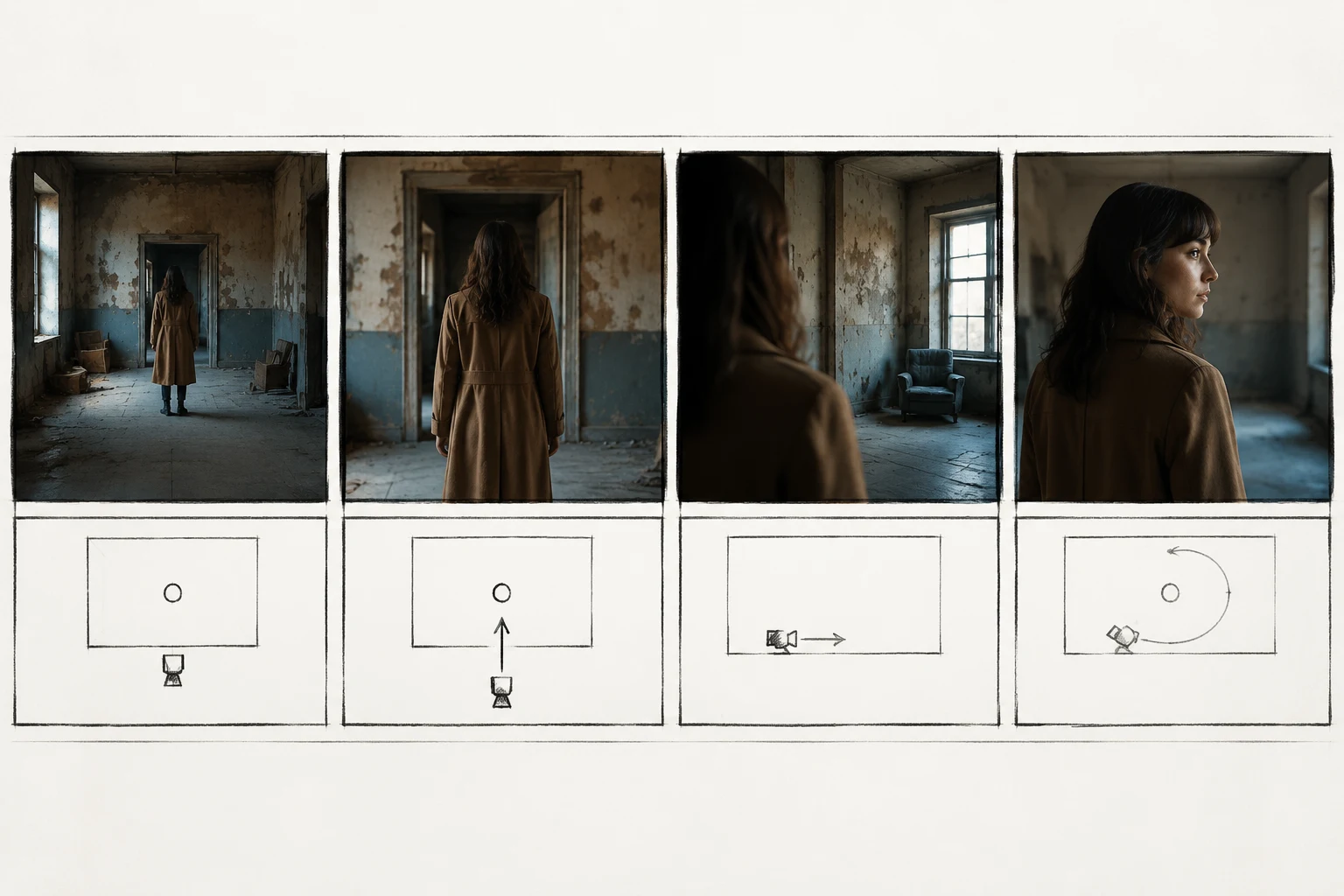
Treat camera motion like a shot list. One shot, one camera job.
Prompt words that actually help
Useful control words:
- slow
- smooth
- gentle
- subtle
- locked-off
- centered
- stable
- keep unchanged
- end on a clean frame
Weak words by themselves:
- cinematic
- epic
- viral
- dynamic
- professional
- aesthetic
You can use taste words, but pair them with actual motion. "Cinematic" is not a camera instruction. "Slow dolly push-in" is.
Troubleshooting
The camera did not move
Fix:
- Put the camera move in the first two sentences.
- Remove competing actions.
- Use a simpler move like slow zoom or dolly push-in.
The subject warped
Fix:
- Slow the move down.
- Reduce orbit or tracking.
- Add a stability line.
- Use locked-off camera for the next test.
The clip feels like a slideshow
Fix:
- Add one small environmental motion.
- Use a slow push-in.
- Make sure the prompt includes motion, not just style.
The product label broke
Fix:
- Use locked-off or slow push-in.
- Keep the label facing forward.
- Avoid rotation and orbit.
- Do not ask for readable tiny text to transform.
Frequently asked questions
What is the best camera movement for AI video?
The safest default is a locked-off camera with subtle subject motion or a slow dolly push-in. Both add life without forcing the model to invent too much new geometry.
Is dolly better than zoom in AI video prompts?
Dolly often looks more cinematic, while zoom is simpler and more stable. Use zoom when you need reliability. Use dolly when the source image is clean and you want a more premium feel.
Can AI video do orbit camera moves?
Yes, but keep the orbit slow and partial. A 15- to 30-degree orbit is safer than a full 360-degree move, especially from one flat source image.
Why does my AI video camera move warp the subject?
The move is probably too aggressive or combined with too many other actions. Use one movement, slow speed, and a stability line that protects face, product shape, hands, text, or background.
Where can I test these prompts?
Use the ClipTrend.ai image-to-video tool for photo-based prompts, or start from AI video templates if you want a prebuilt format.
Related guides
- Image-to-video tool
- ClipTrend.ai AI video templates
- How to make realistic AI videos
- Turn product photos into marketing videos
- Best AI image-to-video tools
Start simple, then direct the shot
Open the ClipTrend.ai image-to-video tool, upload one clean image, and test a locked-off shot or slow push-in first. Once the subject stays stable, add more ambitious pan, tilt, tracking, or orbit prompts.