Product Photo to Video: Marketing Clips From One Image
A product photo to video workflow starts with one clean product image, one small motion, and one export goal. Upload the photo, ask for a slow push-in, light sweep, or small rotation, then cut the result for the platform. ClipTrend.ai turns that image-to-video AI workflow into a browser-based marketing video loop.
Last updated: July 5, 2026 - about 7 min read
Static product photos still matter, but they are easy to ignore in a moving feed. A short product video can make the same bottle, shoe, bag, or gadget feel more premium without booking a studio day. If you need to turn a product photo to video for testing, start with one SKU and one placement before building a batch.
The catch: product motion has to stay believable. If the logo melts or a straight edge bends, the clip stops selling the product and starts advertising the AI mistake.
Which product photos work best?
Good product video starts before the AI model.
| Product photo | Result quality |
|---|---|
| Sharp product on plain background | Best for push-in, light sweep, or small rotation |
| Product in a lifestyle scene | Good for parallax and gentle camera movement |
| Text-heavy label | Keep motion tiny so the label stays readable |
| Reflective jewelry or watch | Use light movement instead of big rotation |
| Busy, low-light phone photo | Reshoot before animating |
The safer the product shape, the more motion you can ask for. The more tiny detail it has, the smaller the move should be.
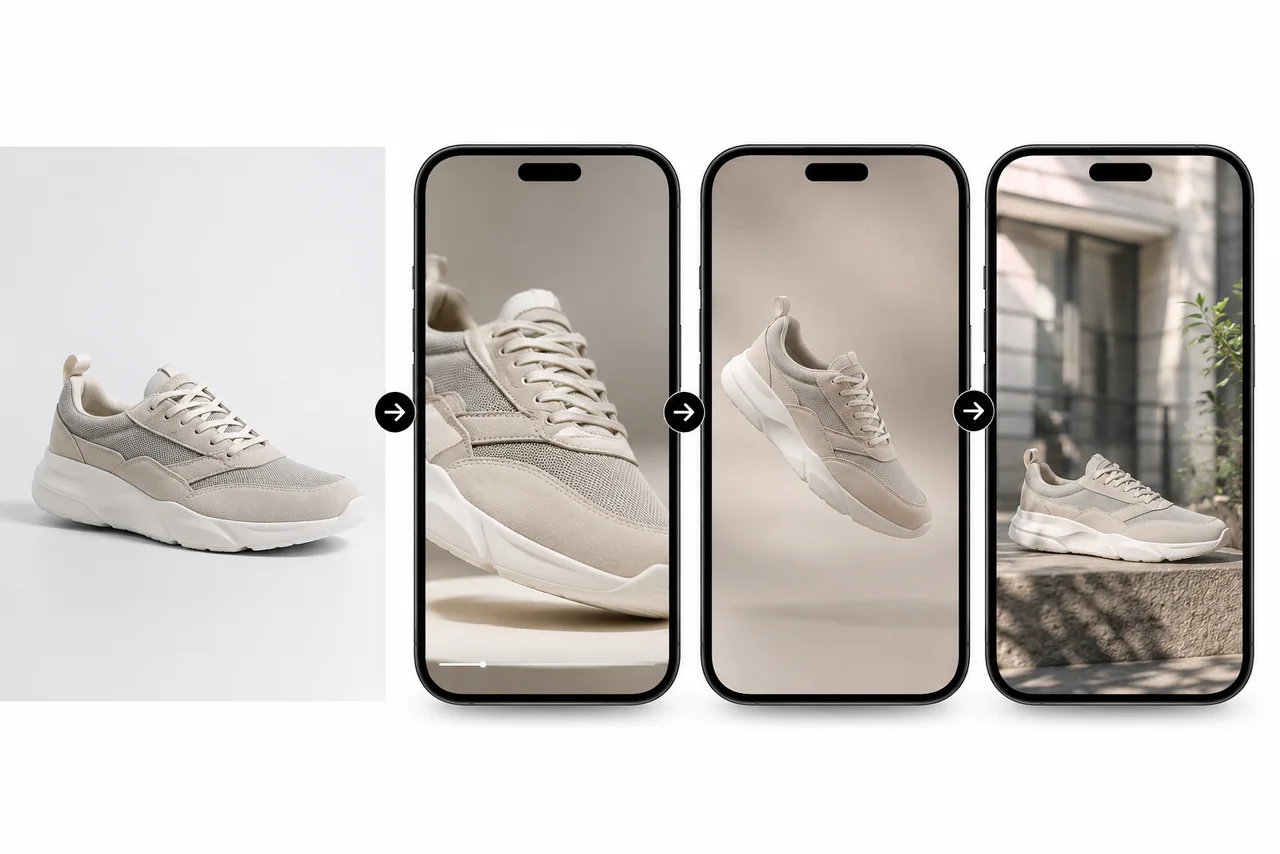
One clean product image can become several short marketing clips when the motion stays small and the export is planned.
Step 1: choose one product and one goal
Do not start with "make an ad." Start with a specific job. The right product photo to video prompt depends on where the clip will appear:
- Shopify product-page loop.
- TikTok Shop or Reels hook.
- Amazon listing video.
- Pinterest product idea.
- Email hero animation.
- Paid social creative test.
The job decides the motion. A product-page loop needs subtle polish. A social feed clip needs movement in the first second. A marketplace listing needs clarity and accuracy.
Step 2: use one motion
The best product photo to video prompts are simple.
Good product motions:
- Slow push-in.
- Gentle 10- to 20-degree turn.
- Soft studio light sweep.
- Small fabric sway.
- Lifestyle parallax.
- Steam, sparkle, or condensation when relevant.
Risky product motions:
- Full 360-degree spin on a label-heavy package.
- Fast zoom on text.
- Hand interaction when the hand is not visible in the source.
- New background plus new camera plus product rotation.
- Any motion that hides what the product actually looks like.
If the product has text, ports, seams, chains, mesh, or a logo, keep the camera nearly still and move the light instead.
Step 3: prompt for preservation
Use this product photo to video prompt structure in the ClipTrend.ai image-to-video tool:
Keep the product shape, logo area, edges, lighting, and background stable. Create a slow studio push-in with a soft light sweep. No label warping, no melting edges, no new objects. End on a clean product hero frame.
For a shoe:
Keep the sneaker shape, sole, laces, stitching, and color stable. Create a slow 10 percent camera push-in with subtle lifestyle parallax. No distorted laces, no warped sole, no new logos. End on a clean final frame.
This is the same broad image-to-video AI family as other still-image workflows, but product content needs stricter preservation because accuracy affects trust.
Step 4: export for the platform
| Platform | Format | Practical length |
|---|---|---|
| TikTok Shop / Reels | 9:16 vertical | 6-15 seconds |
| Shopify product page | 1:1 or 16:9 | 4-10 second loop |
| Amazon listing | 16:9 or 1:1 | 15-30 seconds |
| Meta feed | 1:1 or 4:5 | 6-15 seconds |
| 2:3 or 9:16 | 6-15 seconds |
Do not force one clip everywhere. Use the same source render when possible, but crop and cut for the placement.
How to avoid the fake look
Most product AI mistakes come from asking the model to invent unseen detail. A bottle rotation reveals a back label that was never in the photo. A camera move around a shoe asks the model to guess the hidden side. A fast move across tiny text turns letters into shapes.
Use these fixes:
- Keep the branded face visible.
- Move the light before moving the product.
- Shorten the clip.
- Crop closer so the model has more product detail.
- Test 4 seconds before rendering longer.
- Reject any output that changes the product materially.
The last point matters. Marketing videos should make the product more noticeable, not less honest.
When AI product video is worth it
Use AI when:
- You have many SKUs and need affordable motion tests.
- You already have clean product photos.
- You need social creative variations fast.
- You want product-page loops without a studio shoot.
Use a real shoot when:
- The product has strict legal or technical accuracy needs.
- Hands must demonstrate a complex use.
- The logo or packaging must stay perfectly readable through a large motion.
- You need exact scale, material, or safety details.
AI is a production shortcut, not a permission slip to misrepresent the product.
Frequently asked questions
Can I turn a product photo to video with AI?
Yes. Upload a clean product image to an image-to-video AI tool, ask for one small motion, and export the result for the platform. A slow push-in or light sweep is usually safer than a large rotation.
What product photos animate best?
Sharp, well-lit product photos on simple backgrounds animate best. Products with small labels, reflective surfaces, mesh, chains, or complex edges need smaller motion.
Will AI distort product logos or labels?
It can. Logos and labels distort when the camera moves too far or the model has to invent unseen detail. Keep the label facing front, move the light instead of the product, and run a short test.
How long should a product marketing video be?
For social feeds, 6 to 15 seconds is usually enough. For product-page loops, 4 to 10 seconds works well. Marketplace listing videos can be longer if they stay clear and accurate.
Can I use AI product videos in paid ads?
Yes, if you use your own or licensed product assets and the video accurately represents what you sell. Do not use AI to fake features, packaging, endorsements, or results.