How to Avoid Warped Faces and Hands in AI Videos
To avoid warped faces and hands in AI videos, start with a clear source image, keep the first motion small, and change one cause at a time when a render drifts. A longer prompt is rarely the first fix. The best first test protects the face, hands, and main subject while asking for one simple movement. Use an AI video generator after the source frame is clear enough to support the motion you want.
Last updated: July 16, 2026 - about 10 min read
Warped faces and hands are among the quickest ways to make an AI clip feel unusable. In an image to video AI workflow, they often happen when the model has to invent details that the first frame did not show clearly, reconcile several competing motions, or preserve tiny features while the camera moves too aggressively. The fix is usually less glamorous than the original prompt: improve the source, lower the number of moving parts, and run a test you can learn from.
This guide is about reducing failures, not promising that every generated frame will be perfect. High-detail human motion remains demanding. A controlled workflow gives you a better chance of knowing whether to retry, recrop, simplify, or use a different production method.
Start by naming the detail that cannot break
Before you generate, decide what the viewer must recognize. It might be a person's face, a hand holding a product, a wedding ring, a character's costume, or a product's outline. That protected detail should be large and unobstructed in the first frame.
If a face is tiny in the background, hair covers half the eyes, a hand is crossing the face, or fingers are holding a complicated object, you are giving the model a hard reconstruction task before animation starts. A still image can hide that weakness; motion exposes it.
Make the clip around the strongest visible detail. A close portrait can support a subtle head turn or camera drift. A clear hand holding one simple object can support a small product reveal. A wide crowd scene is a poor starting point for precise finger motion.
The warp-prevention checklist
Use this table before your first render. It separates the common visual risks from the smallest useful change.
| Risk area | Why it warps | Better starting choice | First motion to test |
|---|---|---|---|
| Face | Identity has many small features that must stay aligned | Clear, well-lit face large enough to inspect | Subtle head turn or gentle camera push |
| Hands | Fingers overlap, gesture, and hide behind objects | One visible hand with separated fingers or a relaxed pose | Small wrist movement or no hand motion |
| Hairline and ears | These edges can drift during a portrait move | Hair and ears visible against a simple background | Light hair movement, not a fast turn |
| Product held in hand | The model must preserve both hand and object geometry | Product large, hand simple, no busy label requirement | Slow camera drift while pose stays stable |
| Multiple people | Identity and limb relationships multiply quickly | One main subject for the first test | One person moves; others remain still |
| Fast camera path | New views require invention beyond the first frame | A source with depth and room around the subject | One slow push-in, pan, or drift |
The point is not to remove all personality from a clip. It is to test stability before you add complexity. Once a face or hand holds through a small movement, you can decide whether the idea deserves a second version.
Give an image to video AI model a source image that supports motion
For portraits, choose a photo with even light, a visible face, and enough of the shoulders or torso in frame for the movement you request. A simple background helps the face edge remain readable. If you want a person to turn, avoid a crop that only shows a flat front view with no context around the head or body.
For hands, look for separation. A relaxed hand against a contrasting background is easier to preserve than fingers intertwined with jewelry, hair, glass, fabric, and another hand. If the hand is not central to the story, keep it still or crop it out of the main motion test.
For product interactions, decide whether the product or the person is the priority. If the product must remain exact, use a stable product frame and avoid asking the hand to perform a complicated action. If the expression is the priority, use a portrait composition and let the product remain simple in the scene.
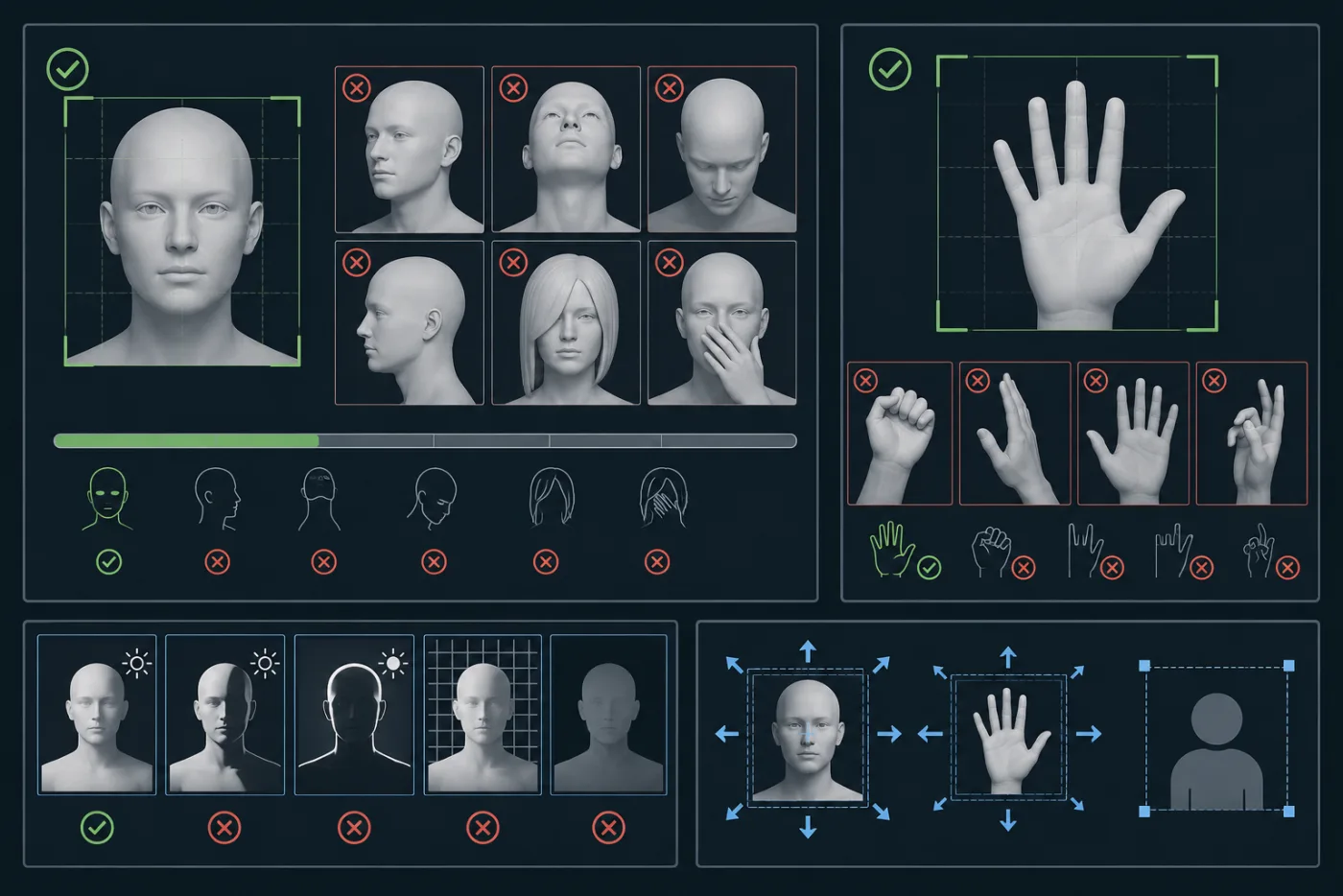
A useful source frame makes the important face or hand detail easy to see before the animation begins.
Write a prompt that protects before it animates
Put the stable details first. A simple structure works well:
Keep the uploaded subject's face, identity, hands, clothing, composition, and lighting stable. Animate [one small action]. Use [one camera movement]. Avoid changing facial features, fingers, or the main object. End on [a simple final frame].
For example: "Keep the uploaded person, face, hands, clothing, and background unchanged. Add a small natural head turn and subtle hair movement. Use a gentle camera push-in. Keep facial features and fingers stable. End with the person looking toward the camera."
This is not a guarantee, but it creates a priority. The model learns what it should preserve before you ask it to move. Avoid mixing a fast orbit, a large gesture, a wardrobe change, a different room, and an emotional performance into the same first prompt. Those requests compete for the same visual budget.
Reduce motion before you increase detail
When a render warps, many people add more visual descriptors. That can make the prompt harder to satisfy. First reduce the movement. Replace "spins around while dancing and waving" with "takes one small step while the camera drifts." Replace a large camera orbit with a slow push-in. Replace a dramatic hand gesture with a stable pose and small environmental motion.
The first successful render does not have to be spectacular. Its job is to prove that the face, hand, product, or character can stay coherent. Once that baseline is stable, you can test one additional action. If it breaks, you know the added action was the pressure point.
Diagnose the artifact before you retry
Not every glitch has the same cause. Review the clip at the moment the artifact starts, not only at the final frame.
- Face changes early: the source face may be too small, hidden, or over-styled; use a clearer portrait and reduce expression change.
- Fingers melt during a gesture: simplify the hand pose, remove the gesture, or let the camera move while the hand stays still.
- Hands and product merge: make one the clear subject, crop closer, and avoid a complex grip.
- Features drift only during a camera move: lower the camera movement or use a source with more surrounding context.
- Everything becomes unstable after a scene change: keep the original setting and test the motion before requesting a new environment.
The goal is to identify one first cause. Changing the source, prompt, camera, duration, and style at once may produce a better clip by luck, but it will not tell you what to repeat next time.
A controlled retry ladder
Use this order when a face or hand fails:
- Repeat the same request once if there was a technical interruption or a clearly random artifact.
- Reduce the motion while keeping the source image the same.
- Simplify the prompt to one action and one camera instruction.
- Replace the source image with a clearer crop or less obstructed face/hand.
- Reframe the concept so the risky detail is not required to perform a complex action.
- Finish outside the generator when the job needs exact hand, product, text, or legal accuracy.
This ladder prevents wasted retries. It also protects a useful idea from being abandoned too soon. Sometimes the concept is sound and the original still simply was not built for the motion.
When to use an edit instead of another generation
Generated video is a poor place for exact claims, legible small text, precise logo placement, or a product interaction that must be factually accurate. Use a normal editor for those jobs. You can still use an AI-generated clip as an atmospheric opening, a transition, a background movement, or a simple product reveal.
This distinction is especially important for advertising. A generated hand can look plausible without demonstrating how a real product is used. Do not let a visually appealing motion clip imply a feature, performance, or interaction that has not been verified.
Build a safer first frame for the next project
The best long-term fix is better source preparation. When you photograph a person for image-to-video, capture a clean portrait with visible hands if hands will matter. Use even light. Leave space around the subject. Avoid stacking accessories, hair, and objects over the same small area. Take a second option with a simpler pose.
For a product and person together, take one frame where the product is clear and another where the person is clear. You may discover that the strongest final ad uses two short stable clips rather than one impossible shot where every detail has to perform at once.
The first-frame checklist is useful before you generate. It helps you decide whether the still gives the model enough room and detail for the motion you have in mind.
FAQ
Why do AI video faces warp?
Faces can warp when they are small, partly hidden, in difficult light, or asked to change too much while the camera and scene also move. Start from a clear portrait and request a small motion before attempting a more complex action.
How can I avoid warped hands in an AI video?
Use a source image with a simple visible hand pose, clear separation between fingers and objects, and modest movement. If the hand is not the story, keep it still while the camera or environment moves.
Should I add more negative instructions to the prompt?
Protecting key details can help, but a much longer prompt is not the first solution. Reduce conflicting motion, keep one main subject, and improve the source image before adding more constraints.
Can I fix a warped clip in editing software?
Sometimes you can crop around a brief artifact, cut to another frame, or use the stable part of the clip. If the face, hand, or product is central and wrong throughout, generate a simpler source-and-motion version instead.
Let the source do more of the work
To avoid warped faces and hands in AI videos, choose a frame that makes the important detail easy to preserve, ask for one small motion, and review the first point where the clip drifts. A controlled retry beats a longer prompt and a random rerender. When your source is ready, test it in an AI video generator with the simplest version of the idea first.