Veo 3.1 Image to Video: How to Try It Free
Yes — at the time of writing you can try Veo 3.1 image to video for free, typically through a Google AI Pro trial that unlocks the Fast tier inside Google Flow (access terms change often, so check the current offer). If you would rather skip the signup, our AI video generator runs Veo 3.1 alongside other models in one place, so you upload a photo and animate it in a couple of clicks.
Last updated: June 18, 2026 · ~6 min read
Veo 3.1 is Google DeepMind's video model, announced in October 2025. It turns a still image into a short, realistic clip with native audio, strong character consistency, and 1080p or 4K output. We have been running it inside ClipTrend.ai for a while now, so this is an honest editor's-eye look at what it does well, where it stalls, and the simplest path to your first clip.
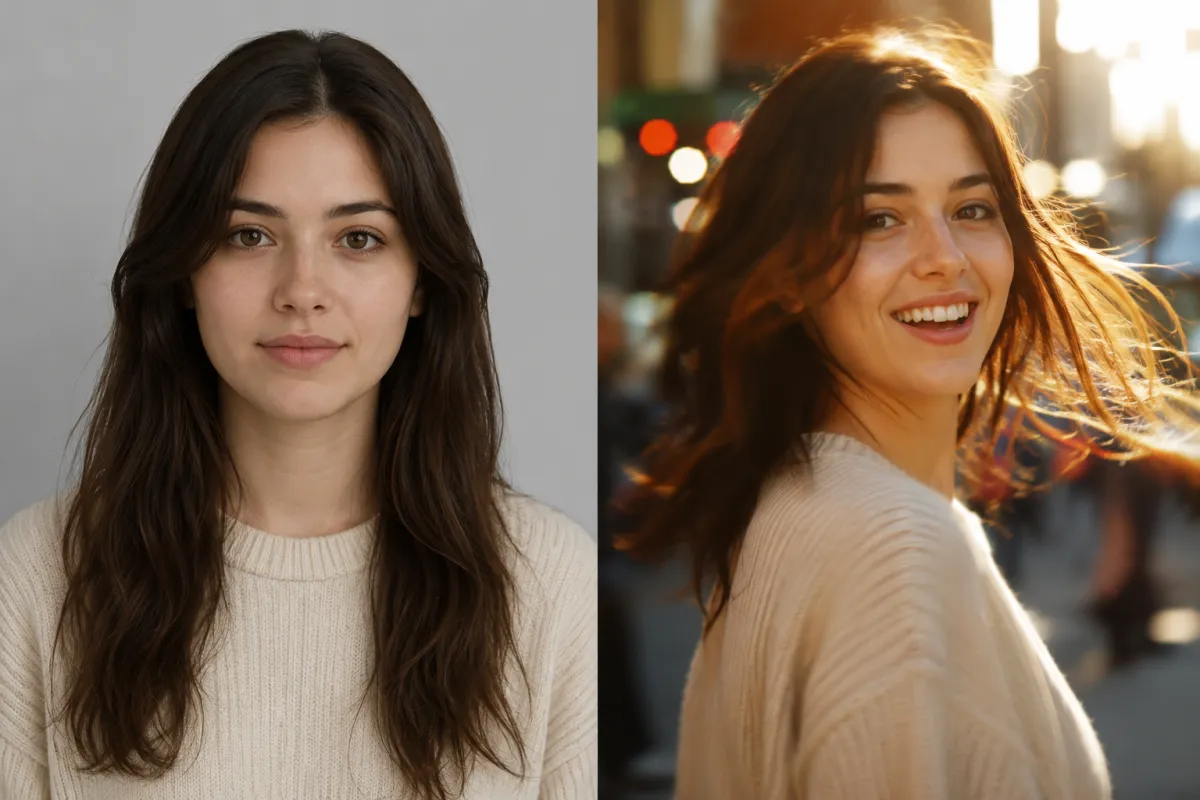
Left: the source photo you upload. Right: a Veo 3.1 frame after the still is animated into motion with synced audio.
How to try Veo 3.1 image to video free
The usual free route is a Google AI Pro trial. At the time of writing it runs for about a month, often without a credit card, and gives you the Veo 3.1 Fast tier through Google Flow — but Google changes trial terms and regional availability frequently, so confirm before you count on it. Here is the short version:
- Sign up for the Google AI Pro trial in the Gemini app or at Google Flow, then open the Flow workspace.
- Upload your starting image and write a prompt describing the motion, camera move, and mood you want.
- Generate, then download your 1080p clip. Each generation spends Flow credits, so plan your prompts before you burn them.
Heads-up: the free trial only unlocks Fast quality. The top Standard/Quality tier sits behind the Google AI Ultra plan ($249.99/mo), and every paid plan meters you with monthly Flow credits.
If juggling a Google subscription, a credit budget, and a separate Flow workspace sounds like a lot, that is exactly why we built our AI video generator the way we did. You can also read the Veo 3.1 model page for the exact settings we expose.
Can Veo 3.1 do image to video well?
Short answer: yes, and it is one of the best at it today. From a single image, Veo 3.1 produces smooth motion, believable physics, dynamic lighting, and audio generated natively with the video. It keeps faces and characters consistent using reference images, supports native vertical 9:16 for mobile, and can extend a base clip (around 8 seconds) into a longer 60-second-plus scene.
It is not flawless, though. Google itself notes that natural, consistent spoken audio, especially short speech segments, is still an active area of development, so lip-sync and dialogue can drift. Every output also carries an invisible SynthID watermark.
Here is how the official Veo 3.1 route compares with running it inside ClipTrend.ai:
| What you care about | Veo 3.1 via Google Flow | Veo 3.1 on ClipTrend.ai |
|---|---|---|
| Free option | 1-month AI Pro trial (Fast tier) | Free credits to test, no Google plan |
| Setup | Google account + Flow workspace | Upload photo, pick model, go |
| Models available | Veo family only | Veo 3.1 plus Seedance, Kling and more |
| Image to video | Yes | Yes, same engine |
| Audio | Native audio | Native audio |
| Watermark | SynthID on all output | SynthID on all output |
You're generating with Veo 3.1 either way — the difference is the workflow around it: one place for text-to-video, image-to-video, and effects instead of stitching together subscriptions.
Veo 3.1 vs a multi-model tool: which should you pick?
If you live inside Google's ecosystem and want raw control over every Flow setting, going direct is perfectly fine. But most people just want to animate one photo without learning a new dashboard or committing to a $19.99-plus plan. That is the gap a multi-model aggregator fills.
Our take: try Veo 3.1 free through Google's trial to judge the quality for yourself. When you want to actually ship clips, a tool that bundles Veo 3.1 with Seedance 2 and Kling 3 saves you from re-uploading the same photo into three different apps.
Frequently asked questions
Is Veo 3.1 image to video actually free?
Not outright. The honest answer is you get a one-month Google AI Pro trial that unlocks the Veo 3.1 Fast tier through Flow, usually without a credit card. After that it is a paid plan. On ClipTrend.ai you also get free credits to test image to video before paying anything.
Who makes Veo 3.1?
Google DeepMind. It was announced in October 2025 as an upgrade to the Veo line, available through Gemini, Google Flow, Google AI Studio, and Google Vids.
How long are Veo 3.1 videos?
Base generations are around 8 seconds. Veo 3.1 can extend a scene and chain clips into longer sequences that run 60 seconds or more while keeping the characters and look consistent.
Does Veo 3.1 support 4K and audio?
Yes. It outputs 1080p and 4K, generates audio natively alongside the video, and supports native 9:16 vertical for mobile-first content. Keep in mind that clean spoken dialogue is still the model's weakest area.
What are the main limitations of Veo 3.1?
Three to watch: spoken audio and lip-sync can drift on short speech, every clip carries a SynthID watermark, and access is metered by Flow credits, with the highest quality tier reserved for the pricey Ultra plan.
Can I use my own photo with Veo 3.1?
Yes, image to video is a core feature, and reference images help it hold character consistency. On ClipTrend.ai you upload your photo, the model animates it, and you download the clip without managing a separate Google subscription.
Related guides
- Try the free AI video generator →
- Veo 3.1 model page
- Seedance 2 model
- Kling 3 model
- See plans and pricing
CTA
Ready to animate a photo without juggling subscriptions? Bring your image to our AI video generator and turn a still into a moving clip in a couple of clicks.